

Landscaping employee training software
Build courses and quizzes, assign them to your crew, run toolbox talks and keep certificates and records in the same system as your jobs and schedule.
Crews take their training on the phone, with the same sign-in they use for the day’s jobs.
Course builder
Build a course your crew will finish
Seasonal crews learn faster from short, practical lessons than from a binder. You build a course from sections and steps, and each step can be a different kind of content.
Mix the step types
Reading, video, audio, picture, PDF, other file, link, checklist, quiz, survey, practical task and acknowledgment. Upload your own video so progress can be tracked; a video hosted on another website cannot be.
Start from a template
Starter templates open as drafts to read and edit to match how you work. Nothing goes live until you tap Publish.
Numbered versions
Publishing makes a version that never changes. People who started it keep it. Publish a new version later and ask earlier finishers to take it again.
Quizzes and practical tasks
A course is only useful if you know the crew understood it. Quizzes support one right answer, several right answers, true or false, put in order and match pairs, and these are graded for you. A written answer waits for a person to grade it. You set the pass mark, the number of tries and the waiting time between them, and each question can show an explanation afterwards.
Some skills cannot be tested on a screen. A practical task asks the employee to describe what they did and attach a picture or PDF, and a picture can be required. The work lands on the To check tab, where you give marks, add a note, then approve it or send it back to redo. You can allow one more attempt if someone runs out of tries.
- Acknowledgment steps record that someone tapped I have read this, with the date. It is a record, not a legal signature.
Assign training automatically to new hires
- Pick the course or checklist Assign a published course to named people with optional start and due dates, or give a new hire a checklist of first-week tasks.
- Set a rule Under Settings, hand out training when someone is hired or when their role changes, limited to the roles you choose, with days to finish and a reminder before the due date.
- Let reminders run Employees are reminded before the due date and managers can be told about late training. One switch pauses every reminder if you need to.
Certificates and training records
| What you need | Where it lives |
|---|---|
| Proof a crew member finished a course | A certificate with a link anyone can use to check it; managers can approve each one first and revoke it with a reason |
| Certificates that expire | An expiry in days, plus an automatic re-assignment before it lapses |
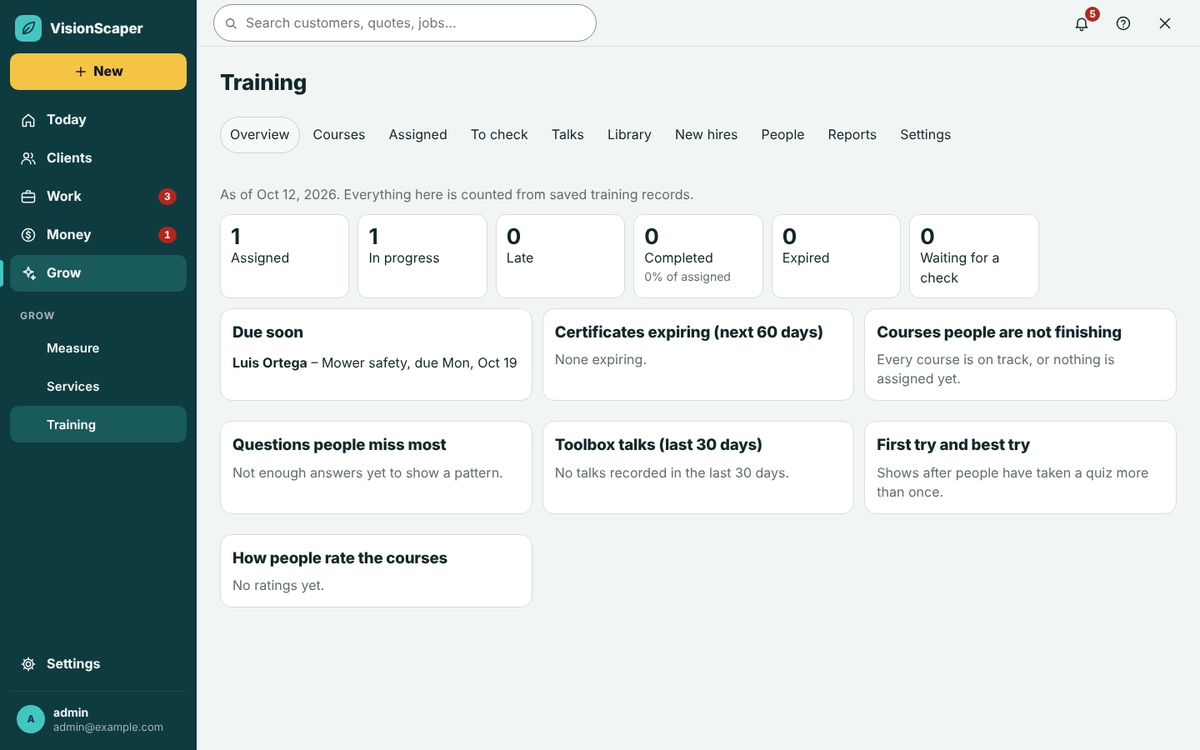
| Who is behind | Overview: not started, in progress, due soon, expired, failed |
| Records for your files | Reports you can download as CSV: every assignment, by person, by course, talk attendance, certificates, questions people miss, safety training hours and read confirmations |
Checklists, policies and the company library
Not everything is a course. The company library keeps your how-tos and policies in one place, and a document can require everyone, some roles or named people to read and agree by a date.
When you change a document you write what changed, and everyone who agreed to the old version is asked again. You can see who agreed and who is late, and reminders go out weekly.
Toolbox talks and tailgate meetings are logged on the Talks tab with a topic, a leader, an expected roster and attendance, so you can show which talks happened and who was there.
- Field checklists with required photos are built under Field work and attach to jobs; see the crew app.
- Hours on talks are the minutes you enter. They are not timed and do not touch the time clock.
Training on the phone, in My work
Employees open My work, tap Training and see their assigned courses with overdue ones first. It uses the same sign-in as the crew app, and the training sits next to the scheduling and time clock your crew already uses.
Finish a course
Read, watch, tick, answer or hand in work, then tap Finish course when every required step is done.
Sign in to a talk
Tap Sign me in to be counted at today’s toolbox talk.
Keep a record
Each person has a training record and can rate a course with stars and a comment.
Who it is for and what it does not do
Training is built for owners and managers of landscape contractors who bring on seasonal crew and want the same onboarding every time. It is not a safety compliance certification, and VisionScaper does not claim that a course satisfies any regulator’s requirement. It gives you the course, the quiz, the attendance and the record; what a lesson must cover is up to you. Access depends on your plan and on the permissions you give each role. For ideas on what to teach, see our guides.
Questions about crew training
They take training in My work, the crew’s phone app, with their own sign-in. A manager has to assign a course before it shows up under My training.
Yes. Upload the video file when you build the step so watch time can be counted, and attach captions if you have them. A link to a video on another website works as a link step but cannot be tracked.
Publishing a new version leaves everyone who already started on the old one. You can optionally ask earlier finishers to take the new version.
Yes. Each talk has an attendance roll, employees can sign themselves in, and the Talk attendance report downloads as a CSV.
Keep exploring
A landscaping crew app for today’s jobs and the time clock
A phone app for landscape crews: today’s jobs, directions, checklists, job photos, a time clock and office…
Landscaping scheduling software for crews and site visits
Schedule crews, book site visits and follow every landscaping job from signed quote to finished work, with…
Software for landscape contractors, from first photo to final payment
For landscape contractors: design on a customer photo, quote, schedule crews, run them from a phone and get paid…
See training next to your schedule
Start your free trial, build a course, assign it and read the records.