

Landscaping scheduling software for crews and site visits
Book site visits and job days on one calendar, put the right crew on each job, and let reminders go out to customers and your team without anyone typing them.
Works with the quote that created the job and the phone app your crew uses.
Turn a signed quote into a scheduled job
- The quote is signed In VisionScaper a job is a signed quote. Drafts and sent quotes are not jobs yet.
- It lands on the Jobs screen Jobs are grouped as Ready to schedule, Deposit paid and ready to schedule, Scheduled, In progress, Done and Cancelled. A group only shows when it has jobs.
- Book a visit Tap Schedule a visit on the job, or tap a day on the Calendar and choose Schedule a signed job.
- Track it to the end Enter real costs for job costing, add finished photos, mark the job done and invoice it from the same card.
Assign crews and use suggested times
The Assign crew tab is a board for one day. An Availability card shows each person’s hours and job count, or why they are off. On a job, tap a name to add or remove that person, and a warning appears if you choose someone who is not available.
On a job with nobody assigned, tap Suggest times and look 3, 7 or 14 days ahead. Suggestions take into account working days and hours, days off, time-off blocks, jobs already booked and the drive between stops. Real traffic is not modelled, and the label says Drive: estimate unless a routing service gave a measured figure.
Suggestions never write anything on their own. You choose Assign this. Sequence stops for the day with the route planner.
- Change a job’s start and end with Change the time, and tick Tell the customer to notify them.
- Assigned employees are told when their schedule changes, unless you turn that alert off.
- Done and cancelled jobs are locked.
See the month, the day or a list
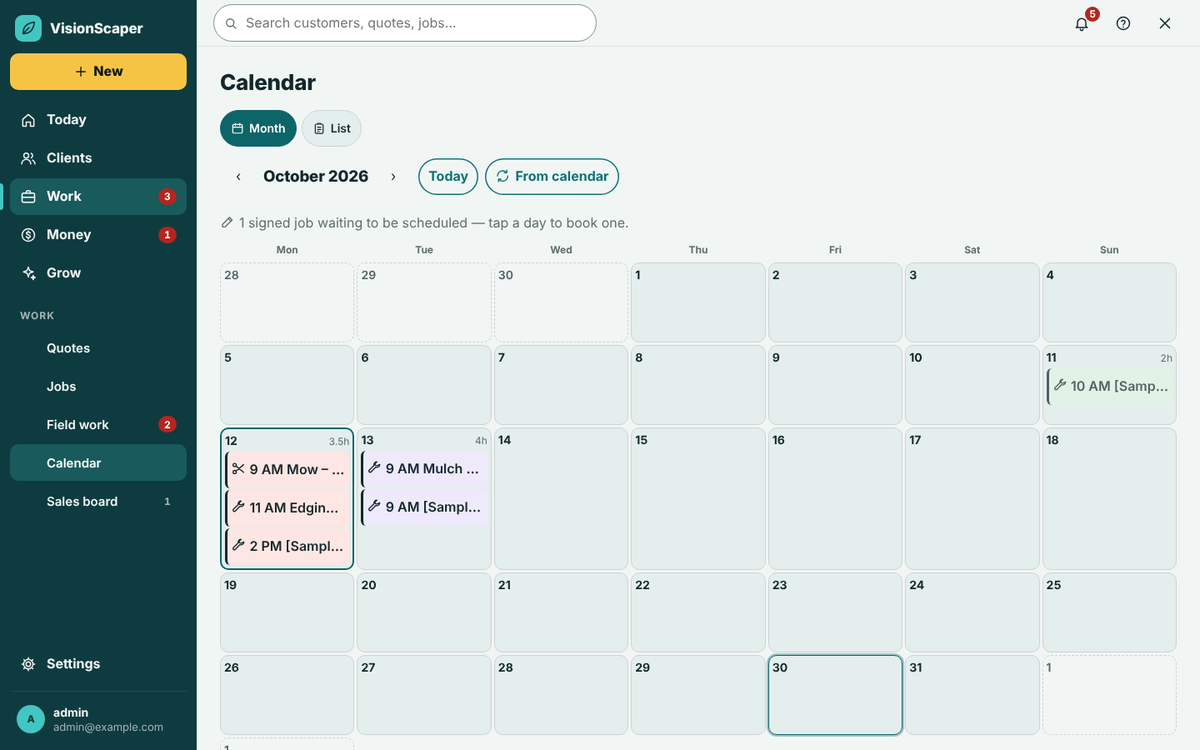
Everything on the schedule is a visit: job days, estimate visits, appointments and time off.
Month view
A Monday to Sunday grid with up to three chips per day. Days show booked hours, and a day that fills your working hours is marked full.
List view
The next four weeks, with a directions link and a call button on every row that has an address or phone number.
The day menu
Tap a day to add a job day, site visit, maintenance visit, follow-up visit, appointment, door-to-door session or time off such as a rain day.
Today dashboard
In Field work, tiles count scheduled, in progress, late, blocked, awaiting approval and completed jobs, and show who is on the clock now.
Reminders that go out on their own
Set the schedule once in Settings, under Reminders. Each rule is a number, a unit and the word before, with email, text and in-app choices. You can add reminders for yourself and choose whether to tell the customer when you book, move or cancel.
Texts never go out between 9 pm and 8 am, and a reminder that would land overnight is sent at 8 pm the evening before. Reminders are rebuilt when an appointment changes. Text reminders need messaging set up and a plan that includes it, and your plan may limit how many reminders each appointment can have. For channel setup and consent, see customer reminders and the texting guide.
Conflict checks when you dispatch from your phone
| What the check finds | What happens |
|---|---|
| Overlap with another job | Nothing is applied until you resend with an override and a short reason |
| The person has time off, a day off, or the job is outside their hours | Same: an override reason is required and logged on the job timeline |
| The person is no longer active | Blocked. It cannot be overridden |
| Someone changed the job meanwhile | The change is refused and the app reloads |
| A repeating series | Choose this one, this and following, or the whole series. Finished jobs are never touched |
Let website visitors pick a visit time
Self-booking is an option on your website request form. A visitor sees open times for the next 14 days, worked out from the working hours, time off and booked jobs of the people you allow. VisionScaper holds that person at that time, so two visitors cannot take the same slot.
A picked time stays a request until your office confirms it, unless you turn on automatic confirmation. Either way an Estimate visit appears on the chosen person’s calendar.
- Set the visit length from 15 to 240 minutes.
- Choose who can be booked.
- Confirming or declining happens in the requests list in the phone app.
Put your schedule in Google, Apple or Outlook calendar
Tap Update from calendar on the Calendar screen to get a private link. Add it to Google Calendar, Apple Calendar or Outlook once, and your visits and any later changes appear there. The feed is read-only, so you change visits in VisionScaper, and your calendar app decides how often it refreshes.
If the link is ever shared by mistake, make a new private link and the old one stops working. This feature can depend on your plan. Crews work from the crew app.
Questions about scheduling landscape jobs
Yes. Site visits, appointments, maintenance visits and follow-up visits can be booked straight from the Calendar day menu or a customer’s page.
A crew member sees a job in the phone app only after you assign them to it and link their VisionScaper account on the Team tab.
Service templates carry a billing frequency such as weekly or monthly, and you can book maintenance visits on any day. Ask us through the contact page how repeating visits will fit your routes. Once visits exist in a repeating series, dispatchers can edit this one, this and following, or the whole series from the phone.
Yes if you tick Tell the customer when you change the time, or if your reminder settings notify customers when you book, move or cancel.
Keep exploring
A landscaping crew app for today’s jobs and the time clock
A phone app for landscape crews: today’s jobs, directions, checklists, job photos, a time clock and office…
Landscaping route planner for the crew’s day
Plan the shortest order for a crew’s day with lunch, fuel and trailer settings, track door-to-door visits and…
Landscape quoting software that starts from the design
Build landscape quotes from a design, a measured plan or a site visit. Use your price book, add e-signature and…
Schedule your next job from a signed quote
Start your free trial and set up your crews, working hours and reminders.