

Landscaping job costing software: plan versus actual
Put the estimate, crew hours, purchases and expenses on one job, and see whether it made money while there is still time to act.
Start with a signed quote; costs build up as the job runs.
What job costing shows on every job
Job costing compares what you estimated with what the job really cost. It starts from a signed quote, so every number has an estimate to be measured against.
Estimated cost
Taken from the cost side of your quote estimates, using your labor rate and overhead.
Actual cost so far
Materials, crew hours, equipment, subcontractors, disposal and delivery, and other costs, with overhead added.
Variance
The gap between the two. It turns red when actual is over estimate.
Actual gross profit
The quote price minus actual cost, with a percent. It turns red under 25 percent.
Enter or collect actual costs: hours, materials, expenses
- Type them on the job Open the job and fill in the boxes you know. Each box shows its estimate underneath, and the summary updates as you type.
- Let the crew record time Hours the crew clocks in the field are approved by you, and approved time priced at each person’s cost rate becomes labor cost. See real hours from the crew app.
- Log expenses with receipts Crew add expenses from the phone with a category, a job and a receipt photo: materials, fuel, equipment and repairs, dump or disposal, subcontractor, supplies, meals or other. You approve or reject each one.
- Tie purchases to the job Bills tied to a job count once, so the same material is not counted twice. See purchase orders and supplier bills.
Plan vs actual and profit alerts
Plan vs actual shows a job’s budget against the cost recorded so far, section by section, with a row for job changes and extra work. A bar shows how much of the budget is used and turns red at your alert level.
Profit alerts list jobs that crossed a line, either Over budget level or Margin under target. You set the alert percentage and the margin floor for each job, or use company defaults, and you can have managers emailed one digest when a job crosses its line.
Be aware of one limit. Only purchased materials are assigned to sections; labor and other costs appear in an Other row, so section figures can look low until bills are in.
- Enter costs as the job goes, not at the end.
- Approve hours so the numbers become final.
A worked example: plan versus actual
| Cost line (made-up numbers) | Planned | Actual so far | Gap |
|---|---|---|---|
| Crew hours (illustrative) | 30 hours | 38 hours | 8 hours over |
| Mulch and edging (illustrative) | 1,200 | 1,450 | 250 over |
| Disposal (illustrative) | 150 | 150 | On plan |
Work out your overhead per labor hour
Quotes that ignore overhead quietly lose money. The Overhead budget card turns a year of overhead into a rate per labor hour. Enter the year, your overhead for the year, your billable labor hours and a target profit, then tap Work it out.
You get overhead per labor hour, profit per hour, overhead as a percent of direct cost and a suggested markup. Nothing changes until you tap Use this, and then it affects new quotes only. Quotes and invoices already made keep their numbers.
Use real totals from last year, and count billable hours, not total hours paid. Try the markup and margin calculator to check how markup turns into margin.
- You need a labor cost per hour set in Settings.
- Apply the suggested markup to chosen service templates; each is saved as a new version.
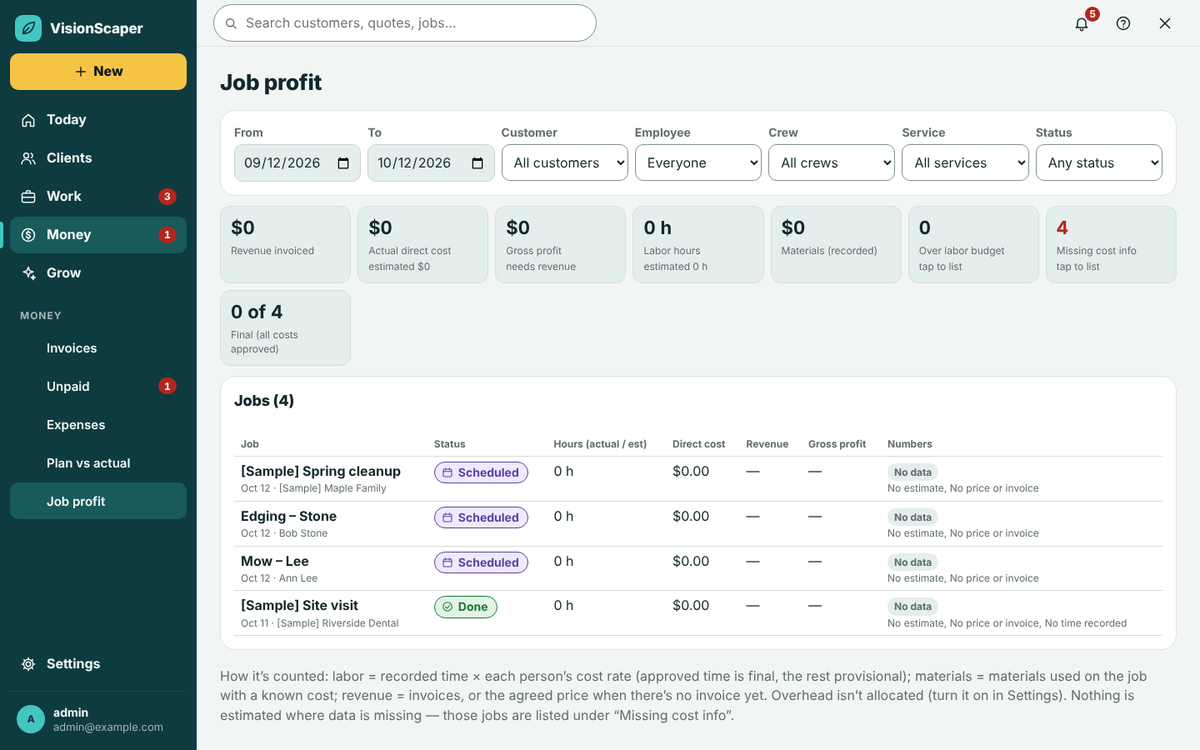
Job profit by job and project
Job profit lists revenue invoiced, actual direct cost, gross profit, labor hours and recorded materials, filtered by date, customer, employee, crew, service and status. Tap over labor budget, missing cost info or final to list those jobs, or open a row to see the job.
Each job is labelled Final when every cost is approved and Provisional when some time is unapproved or revenue is not invoiced yet, with a note on what is missing. Overhead is a separate line, shown only if you turn it on. Money screens are shown only to people with the right to see money.
This is a management view, not accounting advice, and it does not replace your bookkeeper’s books. A profit and loss report is available too, depending on your plan.
Questions about landscape job costing
Yes. Job costing works on signed quotes, so each job has an estimate to compare against.
From time the crew clocks and you approve, priced at each person’s cost rate, or from hours you type on the job. Set cost rates in the Team tab.
No. Bills tied to a job count once.
Only purchased materials are assigned to sections. Labor shows in Other.
Some job costing screens depend on your plan. See the pricing page for what each includes.
Keep exploring
Landscaping purchase order and inventory software
Make purchase orders from a job, track supplier bills, count stock in the shop and trucks, and reorder what runs…
A landscaping crew app for today’s jobs and the time clock
A phone app for landscape crews: today’s jobs, directions, checklists, job photos, a time clock and office…
Landscape quoting software that starts from the design
Build landscape quotes from a design, a measured plan or a site visit. Use your price book, add e-signature and…
Find out which jobs make money
Start your free trial and take one real job from quote to profit.