

Software for landscape contractors, from first photo to final payment
Design on the customer’s photo, quote, schedule crews, run them from a phone and get paid, all in one system with one login.
Start with one real job and see how far it carries.
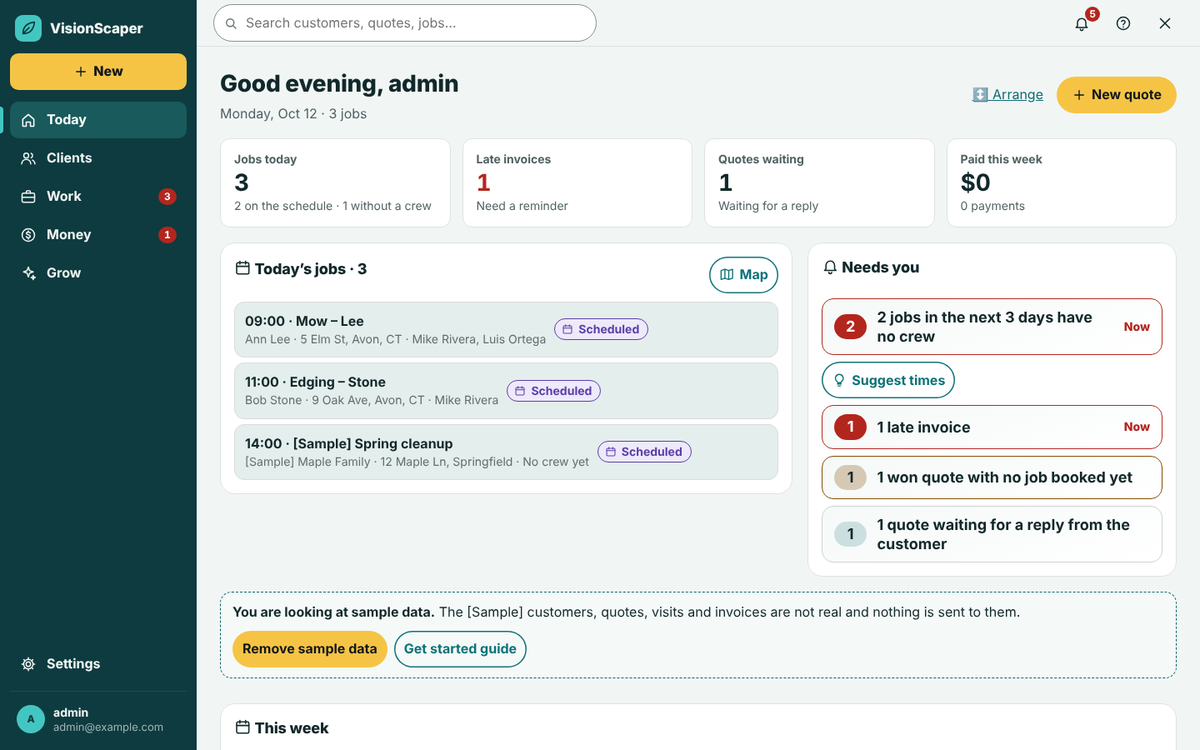
The whole job
What landscape contractors use VisionScaper for
One customer record follows the work from the opening photo to the last invoice.
Show the finished yard
Place plants and paint mulch, stone or pavers on the customer’s own photo.
Quote from saved services
Build a proposal from your own service templates and send it for e-signature.
Run the day from a phone
Crew see the day’s jobs, notes and a checklist, and clock in and out.
Win the install: design, measure, quote
Leads arrive from your website request form, texts, missed calls and outside lead sources, and each one becomes a customer record with a source. The Sales board shows where every deal stands, and a close-rate report shows how many finished deals you won in the last 90 days, by lead source.
Picture a front-bed and patio job. On site you take a photo of the house, then in the designer you place shrubs, paint mulch and set pavers on that photo. Drag the See it grow slider to show the customer that nothing will crowd a window in a few years. The plant library covers East Coast plants.
Back at the truck you search the address and trace the lawn and beds on the aerial image to get square footage. Aerial measuring works for US addresses. Then you start a quote, pull in the design, and add services from your price book. The proposal shows a before and after, scope of work, optional add-ons and your payment schedule.
The customer approves and signs on their phone. A deposit invoice is created at that moment, and if online payments are ready, they go straight to pay it. Your price book values start as placeholders, so you replace them with your own supplier prices and production rates before you rely on them.
Run crews from a phone
The signed quote lands on the Jobs screen as ready to schedule. You book visits on a month calendar, assign people and see who is off before you double-book them. The Route planner puts a crew’s stops in a sensible order and can print a route sheet.
The crew opens My work on a phone. They see the day’s jobs in order, tap for directions, mark en route, arrived and started, pause or block with a reason, tick the completion checklist and take before and after photos. Their sheet leaves prices out. Photos taken without signal are saved on the phone and upload later. Approve hours worked each week and export them for payroll.
Get paid and see which jobs make money
Invoice from the job. Customers can pay by card or bank account through your own Stripe account, and you can send invoices and payments to QuickBooks Online or Xero. Deposits and progress payments come from the payment schedule on the quote.
Material you buy goes through purchase orders and supplier bills that count toward the job. Job profit shows revenue invoiced against actual direct cost, labor hours and gross profit, and flags jobs over budget or missing cost information. That is how you learn whether a patio job paid for itself before you price the next one.
Customers with an account see their work in My Projects: quotes to sign, visits, invoices with a Pay online link, and the job photos you chose to share. They can also ask for more work there, and it lands on the record they already have instead of creating a duplicate. The portal shows no costs, internal notes or crew names.
Train new hires and keep records
Seasonal crews need the same basics every spring. Training lets you assign courses, track who finished them and issue certificates. The company library holds your policies, and checklists and job photos give you a record of what was done and how the site looked when you left.
Reminders, review requests and texts to customers run from the same system, so the office stops juggling separate tools.
Starter
Owner + one crew leader
$59 per month$590 per year
$49 a month, billed yearly
Billed monthly
Choose Starter- 1 field employee
- 50 AI credits a month
- No landscape plan generator
- 5 GB storage
Most popular
Professional
A growing company
$129 per month$1,290 per year
$108 a month, billed yearly
Billed monthly
Start 30-day free trial- 5 field employees
- 200 AI credits a month
- 3 landscape plans a month
- 25 GB storage
Business
A multi-crew operation
$249 per month$2,490 per year
$208 a month, billed yearly
Billed monthly
Choose Business- 15 field employees
- 750 AI credits a month
- 15 landscape plans a month
- 100 GB storage
Pro+
Large or multi-location company
$499 per month$4,990 per year
$416 a month, billed yearly
Billed monthly
Choose Pro+- 50 field employees
- 2,500 AI credits a month
- Unlimited landscape plans a month
- 500 GB storage
30-day free trial. A card is required, and it is not charged until day 31. Cancel from Plan & billing in one tap. Compare every plan
Keep exploring
Landscape design software that works on the customer’s own photo
Design on a photo of the customer’s own yard with an East Coast plant library, true-scale growth over time…
Landscape quoting software that starts from the design
Build landscape quotes from a design, a measured plan or a site visit. Use your price book, add e-signature and…
A landscaping crew app for today’s jobs and the time clock
A phone app for landscape crews: today’s jobs, directions, checklists, job photos, a time clock and office…
Start with one job: start your free trial
Bring a recent job and take it from photo to payment. See the pricing page for plans.